Estimated next spawn
Countdown and local spawn time stay together. Every clear reduces the remaining estimate by 20%.

RED MOON RISING · WINDOWS COMPANION
Keep your estimated spawn time in view. Log landmark clears with your numpad and choose Rogue Red or the smaller Rogue Red Compact.
v1.0.2 · Windows 10/11 x64 · One EXE in ZIP · No installation
YOUR RUN, AT A GLANCE
Phoebe Overlay is an independent companion for The Division 2. Keep the timer above your game, log your own clears, and check what happened without switching to a browser.
Countdown and local spawn time stay together. Every clear reduces the remaining estimate by 20%.
See clears in the current cycle, your session total and your latest action. Undo a mistaken entry.
Change layouts and hotkeys in Settings. Move the overlay, enable click-through or hide it instantly.
TWO VIEWS. SAME PROGRESS.
Switch in the app’s Settings, alongside your hotkeys.
Your timer and activity stay with you.
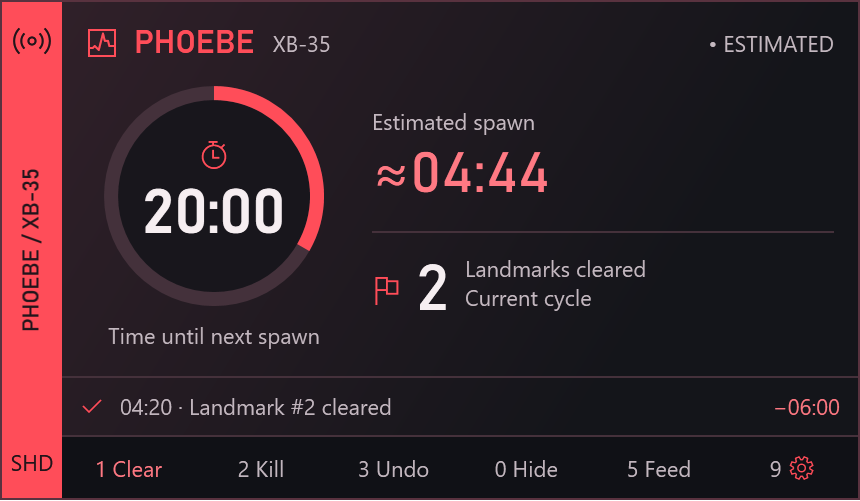
ROGUE RED
A red countdown dial and signal spine give your HUD a tactical look. Estimated spawn and landmark clears stay beside the timer, with your latest activity and shortcuts below.
Shown with sample activity. Actual v1.0.2 app render.
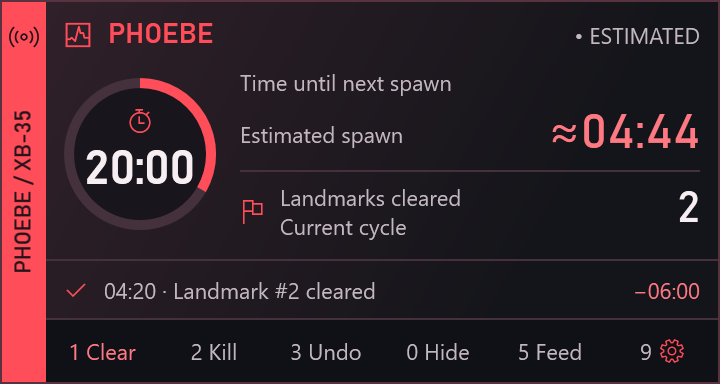
ROGUE RED COMPACT
A smaller dial and tighter arrangement reduce both width and height. Keep your spawn estimate, landmark count, activity feed and configurable hotkeys together.
Shown with sample activity. Actual v1.0.2 app render.
READY IN A MINUTE
The portable app is unsigned. Windows may show a publisher warning. Your activity and settings are saved locally.
All keys are configurable. Add Ctrl, Alt or Shift if another app uses your preferred shortcut.
 AI-generated concept artwork
THE DIVISION 2 · EVENT GUIDE
September 24 – November 3, 2026
Red Moon Rising brings Black Tusk forces to the PvE Dark Zone. As you stay inside, Red Moon Stacks build up, changing your SHD tech with a mix of buffs and drawbacks.
Safehouses pause stack accumulation. Death, leaving the PvE Dark Zone or securing contaminated loot resets your stacks. Event rewards include Exotics, DZ Named items, curated Named items and Prototype gear.
The featured new Exotics are the Vertigo GR9 and Sarru backpack. Defeating the returning Recruiter rewards his unique mask.
Event summary checked October 7, 2026. Read Ubisoft’s official patchnotes ↗
HOW THE TIMER WORKS
Log a Phoebe defeat to begin at 60 minutes. A landmark clear removes 20% of the remaining time at the moment you log it.
For example: if 40 minutes remain, a clear saves 8 minutes and leaves 32. Another immediate clear leaves 25 minutes 36 seconds.
This is a manual estimate. Other players’ clears, an unknown defeat time or changing instances can make the actual spawn earlier or later. Watch the in-game notification when the estimate reaches zero.
Timer model inspired by DJTickle’s Phoebe tracker ↗.
Two layouts. Your shortcuts. One activity timeline.