Windows App v0.9.10
Latest package

ProtoTrack Windows App

Native overlay companion for The Division 2 Prototype Core farming. Track runs, sync drops, show Discord Presence, and keep the HUD visible without the old script workflow.

Native Windows overlay with hotkeys, Discord Rich Presence, tray controls, themes, and update checks.
Package size 775.5 KB
Updated May 26, 2026 08:12
SHA-256 BEEA5B595984
BetaNative Windows build
HUDFull and compact modes
UpdatesServer check enabled
Overlay

Full and Compact HUD

Choose between a readable full HUD and a slim compact view while keeping the same tracking state.

Input

Custom Hotkeys

Record your own hotkeys for runs, prototype drops, sync, tier changes, click-through, and visibility.

Presence

Discord Rich Presence

Show mission, tier, run counts, and session state. Paused sessions no longer keep counting in Discord.

Theme

Overlay Themes

Switch between curated overlay color themes, from classic Proto Orange to SHD Blue and Eclipse Violet.

Install

  1. Download the ZIP file.
  2. Extract it into a folder of your choice.
  3. Start ProtoTrack.exe.
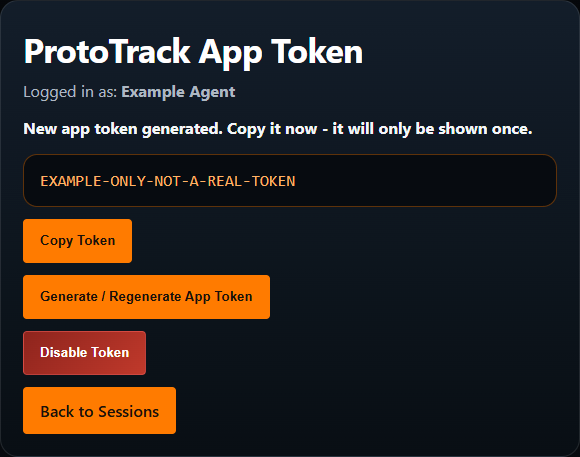
  4. Paste your app token from the website.
  5. Use the configured hotkeys while playing.

Build Details

Current versionv0.9.10
PackageProtoTrack.zip
Size775.5 KB
Last updatedMay 26, 2026 08:12
Full SHA-256: beea5b5959843fe5f23cf739e199742d5516efbf087bb5c827513fa6a9e4e1b8
System

Windows Desktop App

ProtoTrack is a native Windows companion. Extract the ZIP into a trusted folder, then run ProtoTrack.exe directly.

Connection

Token-based Sync

The app connects with your personal token and sends only selected session, run, drop, tier, and timer data to ProtoTrack.gg.

Gameplay

Manual Tracking

The app does not read inventory, stash, game memory, packets, or save files. Hotkeys only record the values you enter while farming.

Security Notes

Windows Defender / antivirus:
Small unsigned Windows apps with global hotkeys, always-on-top overlay windows, tray controls, and standalone packaging can trigger warnings. That warning does not automatically mean the app is malicious.
What ProtoTrack does not do:
It does not inject into The Division 2, read game memory, modify game files, sniff packets, or automate gameplay.

If your antivirus quarantines the ZIP or executable, extract it to a folder you trust and only allow it manually when you trust the source. Keep your app token private; it links the Windows app to your account and active session.

Troubleshooting

ProblemPossible fix
No active session foundStart a session in the Windows app or on ProtoTrack.gg, then refresh or sync.
Sync failsCheck your app token and API URL. The default should point to ProtoTrack.gg.
Cannot end sessionSync pending runs or Prototype drops first. Ending is blocked while values are still pending.
Overlay blocks mouseToggle click-through mode from the app hotkey or overlay controls.
Antivirus blocks itAllow it manually only if you trust the downloaded ProtoTrack build.
Patch notes

Release History

View JSON
v0.9.10 2026-05-26 current

Updater Polish

  • Added a one-time Updated to v... status after a successful auto-update restart.
  • Polished the update dialog with clearer version cards and cleaner patch note formatting.
v0.9.9 2026-05-26

English UI Polish

  • Changed the remaining German update dialog labels to English.
v0.9.8 2026-05-26

Updater Test

  • Added a small updater validation release so ProtoTrack 0.9.7 can test automatic download, install, and restart.
v0.9.7 2026-05-26

Auto Updater

  • Added an in-app update dialog that shows release notes and matching patch notes.
  • Added automatic ProtoTrack.zip download and install flow with a temporary updater helper.
  • Added automatic restart after a successful update.
v0.9.6 2026-05-25

Reliable Tray Exit

  • Made Exit ProtoTrack reliably clear Discord Presence, remove the tray icon, and terminate the process.
v0.9.5 2026-05-24

Compact Goal View

  • Added compact overlay goal progress for active Proto or Runs goals.
v0.9.4 2026-05-24

Hotkey Recorder Guard

  • Protected the hotkey recorder so it only captures after an intentional click and cancels on focus loss.
  • Prevented the "Press hotkey..." placeholder from being saved as a hotkey.
v0.9.3 2026-05-24

Single Instance Fix

  • Added single-instance protection so starting ProtoTrack again does not create extra background processes.
  • Clarified tray actions with Show / Hide Overlay and Exit ProtoTrack.